Back up each part of a Docker application by what its data requires: archive file volumes that are safe to copy, use the database engine's own backup method for live databases, and save the Compose configuration. Then restore everything in isolation and check the records, the files, and one controlled write. Your database, your acceptable downtime, and whether you recover one app or the whole host decide the method.
What a Docker backup needs to preserve
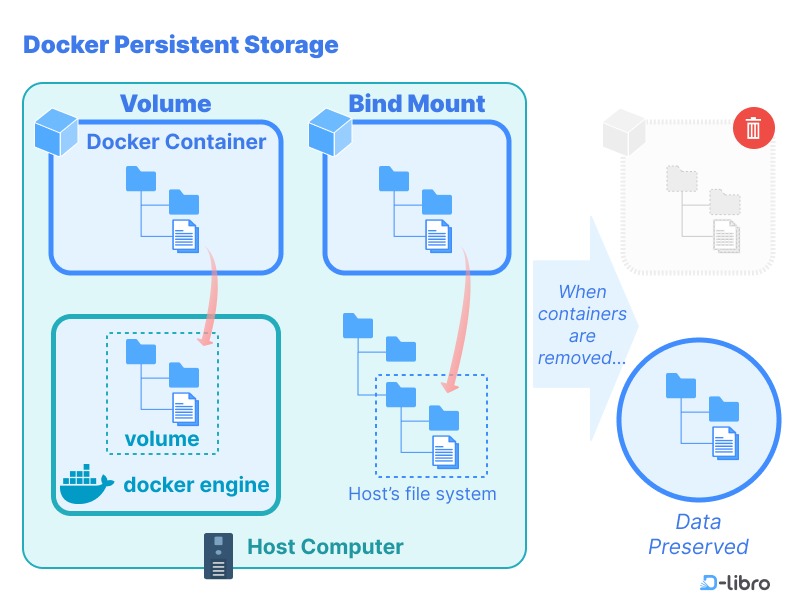
A container image holds the software needed to recreate a container. The data your application must keep lives outside the image: in named Docker volumes, anonymous volumes, host bind mounts, a database, or an external service. A Compose file describes the deployment but contains none of the user-generated data.
Take a web service that keeps uploads in one volume, PostgreSQL records in another, and credentials in protected configuration. Rebuilding the image brings back the application process. Bringing back the site also takes the uploads, the database, and the credentials.
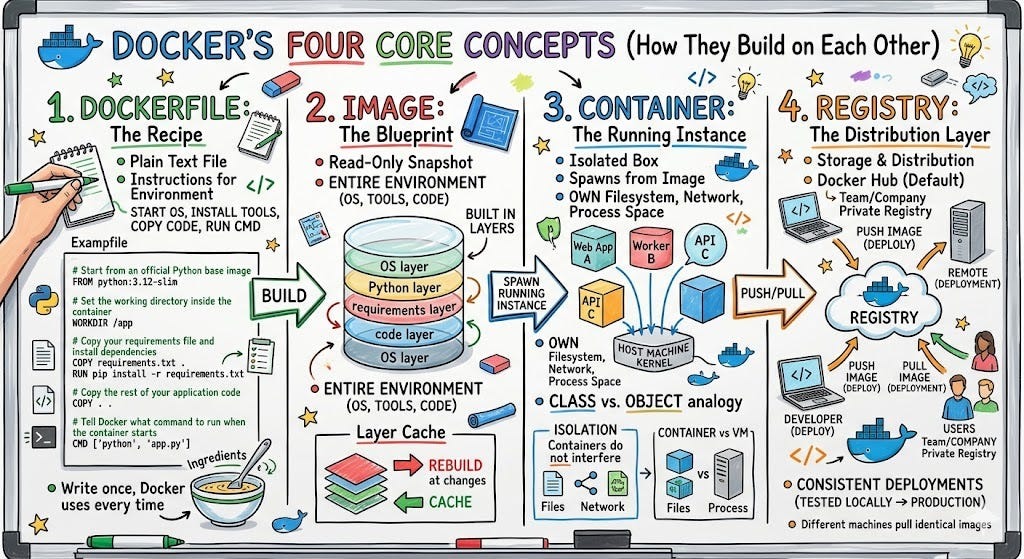
Anything written only to a container's writable layer and never moved to persistent storage needs a backup too. Docker's commit leaves out the contents of mounted volumes, so a committed image does not replace a backup of those mounts.
- Rebuildable runtime: Compatible images and service configuration used to recreate containers.
- Persistent files: Uploads, generated content, and other files held in Docker-managed or host-mounted storage.
- Database state: Records and database objects, captured with a consistency mechanism that fits the engine.
- External dependencies: Remote databases and object storage the application needs after recovery. They need their own recovery procedures.
Inventory named volumes, bind mounts and missing dependencies
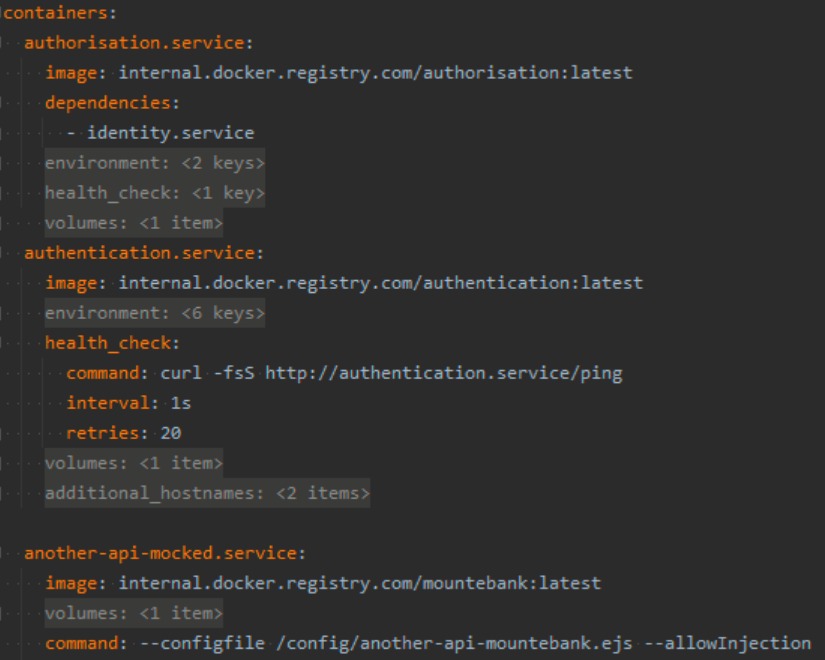
To find the data you must protect, check both the resolved Compose configuration and the mounts on the running containers.
Run these from the Compose project directory, with its normal project settings:
docker compose config --volumes
docker compose config --images
docker volume ls
docker inspect CONTAINER --format '{{json .Mounts}}'
Replace CONTAINER with a real name or ID, and inspect every service that stores data. The Compose command lists declared volumes. Inspection also shows host bind paths and the source of each mount.
The Compose project name can change generated volume names. A declaration called dbdata resolves to a project-prefixed volume, while an explicitly named external volume keeps its own name. Anonymous volumes get Docker-generated identifiers and can fail to reattach after you recreate the container. Write down their source and container destination before losing the original container's metadata.
| Service | State to preserve | Illustrative source | Backup route | Recovery check |
|---|---|---|---|---|
| Web | Uploads | project_uploads | Safe volume archive | Known upload present |
| Database | PostgreSQL records | Database using project_dbdata | Logical export | Expected record readable |
| Web | Configuration files | /srv/app/config | Controlled host-file copy | Settings load |
| Application | Credentials | Protected secret source | Secured recovery record | Authentication works |
The source names above are fictional.
One user in an r/selfhosted discussion about volume coverage described the gap: “But I realized that ‘a backup exists’ and ‘the Docker volumes I care about are actually covered and recent enough to restore from’ are not exactly the same thing.”
Your inventory should map every persistent mount to a backup artifact and a recovery destination. Update the map whenever services or mounts change.
Choose a backup method that matches the data and its write activity
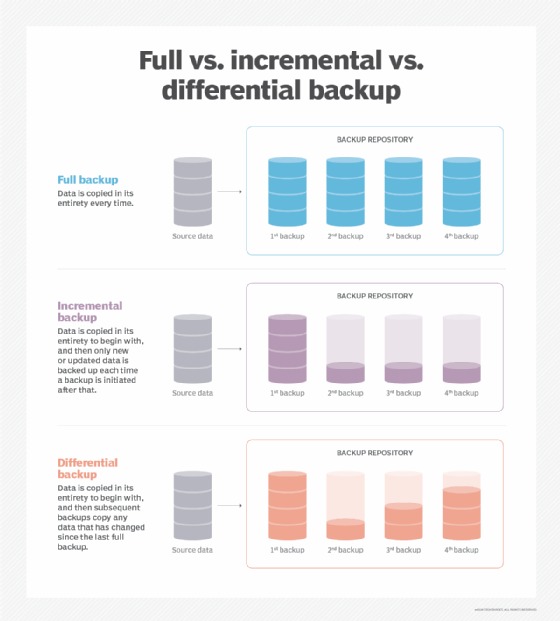
File archives and database backups need different consistency guarantees. Before you copy anything, decide how each data source reaches a valid recovery point.
| Workload | Appropriate method | Deciding condition |
|---|---|---|
| Static file volume | Volume archive | Files stay unchanged during capture |
| Changing application files | Application quiescence or coordinated snapshot | Related writes are consistent |
| PostgreSQL | pg_dump or supported physical backup | Logical snapshot or coordinated physical process |
| MySQL InnoDB | Scoped mysqldump --single-transaction | Transactional tables, with DDL restrictions |
| SQLite | Online Backup API or CLI .backup | Database-aware capture of an active file |
| Compose application | All parts backed up together | Related files, database state, and configuration match |
Write activity decides the method. In an r/selfhosted Docker backup discussion, a user asked: “I have a couple of volumes that are just plain files and those are easy to back up. But what do you do to backup e.g. Postgres databases?”
pg_dump takes an internally consistent logical snapshot while normal database operations continue, except for operations that need exclusive locks. A plain tar of a data directory that is still changing is not a valid physical backup.
A file-based application can need a graceful stop of its writes. Pausing the process is not enough, because it does not show that the state was flushed safely. For each inventory entry, record whether you capture it online, quiesced, shut down, or through the application's own backup interface.
Back up and restore a named Docker volume without guessing its path
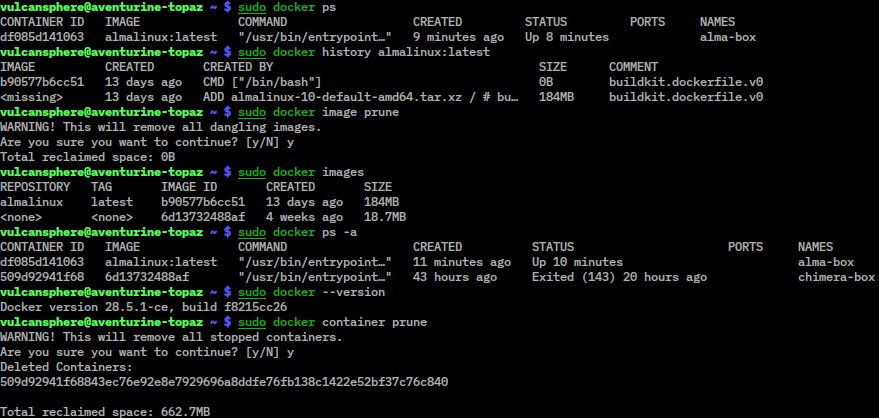
Docker documents archiving a named volume with a temporary container. Use this for file data that is already consistent, and take the exact volume name from your inventory.
In these examples, demo_assets is the source volume and /srv/backups/docker is the host backup directory. Each run creates its own subdirectory with an assets.tar inside, so a failed run cannot overwrite an earlier archive. Make sure the parent directory exists and is writable.
SOURCE_VOLUME=demo_assets
BACKUP_ROOT=/srv/backups/docker
ARCHIVE_NAME=assets.tar

if docker volume inspect "$SOURCE_VOLUME" >/dev/null 2>&1 \
   && [ -d "$BACKUP_ROOT" ] && [ -w "$BACKUP_ROOT" ] \
   && ARCHIVE_DIR=$(mktemp -d "$BACKUP_ROOT/assets-XXXXXXXX"); then
  if docker run --rm \
    -v "$SOURCE_VOLUME:/data:ro" \
    --mount "type=bind,source=$ARCHIVE_DIR,target=/backup" \
    ubuntu tar -cf "/backup/$ARCHIVE_NAME" -C /data . \
    && test -s "$ARCHIVE_DIR/$ARCHIVE_NAME"; then
    printf 'Archive created: %s\n' "$ARCHIVE_DIR/$ARCHIVE_NAME"
  else
    printf 'Volume archive failed; discard this attempt\n' >&2
    false
  fi
else
  printf 'Source volume or backup directory unavailable\n' >&2
  false
fi
The guard stops Docker from silently creating an empty volume when the source name is wrong. Archive paths are relative to /data. Keep the printed archive directory for the restore commands, and set ARCHIVE_DIR to it if you restore from another shell.
When the container command succeeds, check that the file is not empty and list its entries with the host's tar:
test -s "$ARCHIVE_DIR/$ARCHIVE_NAME" && \
  tar -tf "$ARCHIVE_DIR/$ARCHIVE_NAME"
For a rehearsal, restore into a fresh volume called demo_assets_restore. This block stops if the target already exists instead of extracting over its contents:
TARGET_VOLUME=demo_assets_restore

if docker volume inspect "$TARGET_VOLUME" >/dev/null 2>&1; then
  printf 'Restore target already exists; stop\n' >&2
elif docker volume create "$TARGET_VOLUME"; then
  docker run --rm \
    -v "$TARGET_VOLUME:/restore" \
    --mount "type=bind,source=$ARCHIVE_DIR,target=/backup,readonly" \
    ubuntu tar -xf "/backup/$ARCHIVE_NAME" -C /restore
fi
Check the restored contents from a separate container:
docker run --rm -v "$TARGET_VOLUME:/restored:ro" ubuntu ls -la /restoredArchive tools, the user running them, and the target filesystem can change ownership and mode bits. Check access under the UID and GID the application runs with.
This syntax follows Docker's volume backup and restore documentation.
Back up PostgreSQL, MySQL and SQLite using database-aware methods
A running database needs a backup method its engine supports. A logical export produces a database-aware file that you can import into a prepared destination. To import from another shell, set BACKUP_DIR to the directory the export printed.
Each example assumes the client, user privileges, credentials, and a compatible restore environment are already in place. Accept an export only after its command succeeds.
PostgreSQL logical export and restore
This pattern needs a running PostgreSQL service and a writable host backup directory.
DB_SERVICE=db
DB_USER=app_user
DB_NAME=appdb
BACKUP_ROOT=/srv/backups/docker

if [ -d "$BACKUP_ROOT" ] && [ -w "$BACKUP_ROOT" ] \
   && BACKUP_DIR=$(mktemp -d "$BACKUP_ROOT/postgres-XXXXXXXX"); then
  if docker compose exec -T "$DB_SERVICE" \
    pg_dump -U "$DB_USER" -d "$DB_NAME" \
    > "$BACKUP_DIR/postgres.sql" \
    && test -s "$BACKUP_DIR/postgres.sql"; then
    printf 'Export artifact created: %s\n' "$BACKUP_DIR/postgres.sql"
  else
    printf 'PostgreSQL export failed; discard this attempt\n' >&2
    false
  fi
else
  printf 'PostgreSQL backup directory unavailable\n' >&2
  false
fi
To restore this plain SQL dump, prepare an empty, compatible target database and load the file through psql. The example assumes a separate Compose recovery environment with its database service running:
docker compose -p app_restore_test exec -T "$DB_SERVICE" \
  psql -X --set ON_ERROR_STOP=on \
  -U "$DB_USER" -d "$DB_NAME" \
  < "$BACKUP_DIR/postgres.sql"
pg_dump covers one database. Cluster-wide roles and other global objects need separate capture, and you should also check extensions, privileges, and version compatibility on the destination. PostgreSQL documents other tools for global information, including pg_dumpall.
MySQL transactional export and restore
For InnoDB tables, the documented --single-transaction option produces a consistent transactional view. Nontransactional tables and concurrent schema changes limit that guarantee. If the database uses stored procedures, functions, or scheduled events, add --routines for procedures and functions and --events for events, and make sure you have the required privileges. Triggers are included by default unless disabled.
MYSQL_SERVICE=mysql
DB_USER=app_user
DB_NAME=appdb
BACKUP_ROOT=/srv/backups/docker

if [ -d "$BACKUP_ROOT" ] && [ -w "$BACKUP_ROOT" ] \
   && BACKUP_DIR=$(mktemp -d "$BACKUP_ROOT/mysql-XXXXXXXX"); then
  if docker compose exec -T "$MYSQL_SERVICE" \
    mysqldump --single-transaction -u "$DB_USER" "$DB_NAME" \
    > "$BACKUP_DIR/mysql.sql" \
    && test -s "$BACKUP_DIR/mysql.sql"; then
    printf 'Export artifact created: %s\n' "$BACKUP_DIR/mysql.sql"
  else
    printf 'MySQL export failed; discard this attempt\n' >&2
    false
  fi
else
  printf 'MySQL backup directory unavailable\n' >&2
  false
fi
Once the destination database and authentication are ready in the separate recovery project, import the plain SQL file with the MySQL client:
docker compose -p app_restore_test exec -T "$MYSQL_SERVICE" \
  mysql -u "$DB_USER" "$DB_NAME" \
  < "$BACKUP_DIR/mysql.sql"
The MySQL 8.4 manual describes mysqldump for that version. MariaDB needs the options and restore steps that match its own client and server.
SQLite online backup and restore
For SQLite, use the online backup API or the CLI .backup command, run from an environment that can access the database. The CLI pair:
sqlite3 SOURCE_DB ".backup 'BACKUP_DB'"
sqlite3 TARGET_DB ".restore 'BACKUP_DB'"
Paths resolve where sqlite3 runs. Move the resulting backup into your recovery set and restore it only to a separate target. An ordinary copy of a changing SQLite file can miss live state.
Save the Compose configuration and recovery dependencies
Keep the Compose files next to the data they describe. Compose interpolation and resolved configuration can expose secret values, so protect that output and keep passwords and keys out of public files and examples. A tag such as latest is mutable and cannot identify the exact build you need to recover.
Your recovery set, meaning everything you need to bring the application back, has three parts:
- Configuration: Compose and override files, Dockerfiles, image references, service relationships, and proxy or TLS settings.
- Data: File archives and database exports, each with its source, its recovery destination, and the time of the recovery point.
- Access: Credentials, keys, and certificates, or a secure way to retrieve them during recovery.
Database records and uploaded files must match. If you export the database and archive the uploads at different moments, the two can disagree about which files exist.
A recovery host can differ from the original in paths, file ownership, architecture, networking, and image or database versions. A bind mount at /srv/app/uploads on the source does not create that directory on the recovery host. Write these dependencies down in one manifest.
Store, schedule and monitor backups so they survive a host failure
Keep a copy outside the original host's failure domain, behind access controls. Recovery Point Objective (RPO) is how much data you can afford to lose, measured as the age of the newest usable backup. Recovery Time Objective (RTO) is how long you can wait for a working service. Set retention and frequency from your RPO and the application's write rate. Monitor the job's exit status, the last successful transfer, the age of the stored backup, and overdue alerts. A passing check on a Restic repository (Restic is a backup tool) shows only that the repository passed Restic's own checks. The recovery rehearsal tests the application itself.
Restore the application in an isolated Compose project

Restore into a deployment with its own data targets and no route into production. A second project name helps, but external volumes, bind paths, remote database endpoints, and published ports can still overlap with production.
Say production runs as app_prod and the rehearsal as app_restore_test. The file-volume procedure above created demo_assets_restore, and the recovery configuration must attach exactly that volume to the right service mount.
This Compose fragment for the recovery project maps its uploads declaration to the already populated volume:
services:
  web:
    volumes:
      - uploads:/var/www/uploads
volumes:
  uploads:
    external: true
    name: demo_assets_restore
Because the volume is declared external, Compose uses the name you give it, and a different project name does not rename it. The restored database needs its own recovery target and service endpoint too.
Before starting the stack, check the adapted Compose file for host port collisions, shared bind directories, external storage, network access, credentials, and image versions. Restore the files into the chosen volumes and import the database backups with the tools shown above. Bring up storage and the database before the application that uses them.
Destructive option: docker compose down removes the project's containers and networks and leaves declared named volumes in place by default. Adding -v also removes the project's declared named volumes and attached anonymous volumes. External volumes are not deleted. Never run down -v as casual cleanup on a project with data you want to keep.
Once the restore project is configured, start the isolated stack:
docker compose -p app_restore_test up -dVerify the restored data and diagnose failures before trusting the backup
Test the recovered application with known data and normal application operations. Each earlier success proves only part of the picture:
| Observation | What it shows | What remains to test |
|---|---|---|
| Backup job completes | The job returned its completion status | Source coverage and artifact content |
| Archive or repository check succeeds | The file or repository passed the performed integrity checks | Database consistency and application recovery |
| Database import completes | The selected import procedure finished | Correct records and dependent files |
| Container starts | The runtime reached its reported service state | Authentication, mounts, data access, and writes |
| Application acceptance passes | Specified records, files, and functions work in the test environment | Unexamined scenarios and production-specific constraints |
An operator who recovered a Nextcloud service after a MariaDB problem described the result in an r/selfhosted recovery discussion: “The backups weren’t tested so I had luck that it worked + the permissions were all destroyed but with the old files + little work I was able to restore everything.”
Take a disposable test application with one known account, one known database record, and one uploaded file. Run this acceptance sequence:
- Files: Find the expected upload and compare its content with the pre-backup original.
- Database: Retrieve the expected record from the recovered instance.
- Application: Confirm that it starts in the recovery environment, that you can authenticate where required, and that the record and the upload open through its interface.
- Safe write: Create a disposable record or file in the isolated instance without reaching production.
- Recovery objectives: Compare the age of the backup's data with your RPO and the measured recovery time with your RTO.
If the app looks empty, check the destination volume name, the actual mounts, and the database endpoint before changing anything. For file-access failures, look at UID/GID ownership and filesystem permissions. For login or database failures, look at missing secrets, incompatible versions, incomplete imports, or the wrong external service. Compare the failure with your recovery manifest and the service's error output.
Decide which Docker backup strategy fits your recovery requirements
Match the strategy to your RPO, your RTO, and the scope of recovery you need.
| Strategy | Suitable scenario | Trade-off to accept |
|---|---|---|
| Per-application Compose recovery set | Recovering one damaged application on a shared host | You must track data, secrets, configuration, and other dependencies. Later changes to unrelated services stay intact. |
| Whole-host or VM backup, such as one managed through Proxmox Backup Server (a VM backup tool) | Restoring a larger host environment | Rolling back the whole machine also rolls back unrelated services |
| Backup repository holding valid artifacts | Protected history and retention | Storage integrity and application-consistent capture are handled separately |
A small service with a maintenance window can pair a safe file archive with a database export. An online SQL workload can need logical database backups, with its file state coordinated separately.
